ChatGPT Audience Targeting: Set Up Custom Audiences
On this page
- What ChatGPT custom audiences actually do
- How to prepare your custom audience file for upload
- Why your audience may show up as exclusion-only
- Case study: Creating audience segments for a working professionals course
- Merge audiences when one list is too small or too narrow
- The smartest setup pairs audience targeting with AI visibility data
On March 2026, OpenAI’s How India Uses ChatGPT report said ChatGPT had over 800 million users globally and that India was one of its largest weekly active-user markets. On August 31, 2026, OpenAI said the ad-supported product was available to more than 1 billion weekly active users and that ChatGPT Ads had reached a $1 billion annualized revenue run rate in less than 200 days. That is a big shift in a short time: AI discovery is no longer just a product story. It is a media story too.
At EasilyGeo we sit right at that overlap. We track how brands appear across ChatGPT by engine and geography.
In this guide, we will explain:
how ChatGPT Ads custom audiences work
how to use them to reach relevant customers with first-party data
how to prepare and upload audience files
why some audiences are limited to exclusions only and
when to merge smaller lists
If you are new to the platform, you should also explore our ChatGPT Ads campaign manager guide for a broader overview of setting up and managing campaigns.
What ChatGPT custom audiences actually do
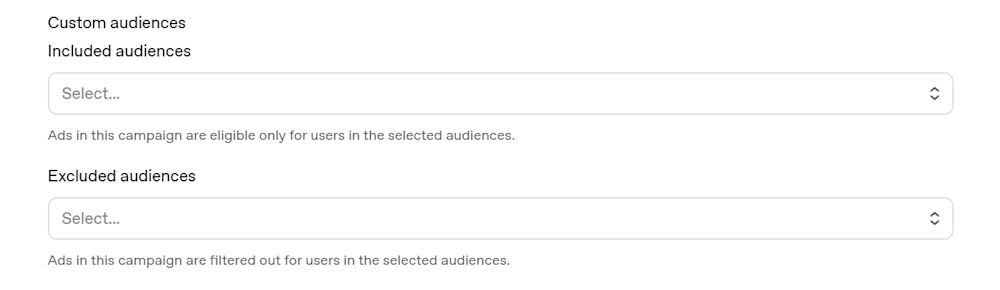
ChatGPT Ads custom audiences let you upload your own first-party customer or prospect lists and use the matched audience in two ways:
Campaign inclusion: For a course provider, that means you might include leads who downloaded a digital marketing syllabus.
Campaign exclusion: You will exclude students who have already enrolled and bid up for working professionals who visited your pricing page.
This way you’ll end up saving your money for relevant ads.
How to prepare your custom audience file for upload
Use a valid UTF-8 CSV or TXT file up to 500 MB.
A CSV needs a header row with supported column names such as email, phone_number, email_sha256, phone_number_sha256 or gaid.
A TXT file needs one identifier per line and no header.
Accepted identifiers are email addresses, phone numbers, SHA-256 hashed emails, SHA-256 hashed phone numbers and Google Advertising IDs. In CSV uploads, supported identifier types can be mixed in one file.
Audiences can exceed 5,000,000 members and that you can later add, remove or replace members without rebuilding the audience or updating campaigns already using it. We still recommend tight naming like IN_course_webinar_midcareer_Q3 so refreshes and reporting stay readable.
Processing usually takes 20 to 30 minutes, sometimes longer for bigger files. Final matched counts often land well below uploaded rows because invalid values, duplicates and unmatched identifiers are removed during processing.
Why your audience may show up as exclusion-only
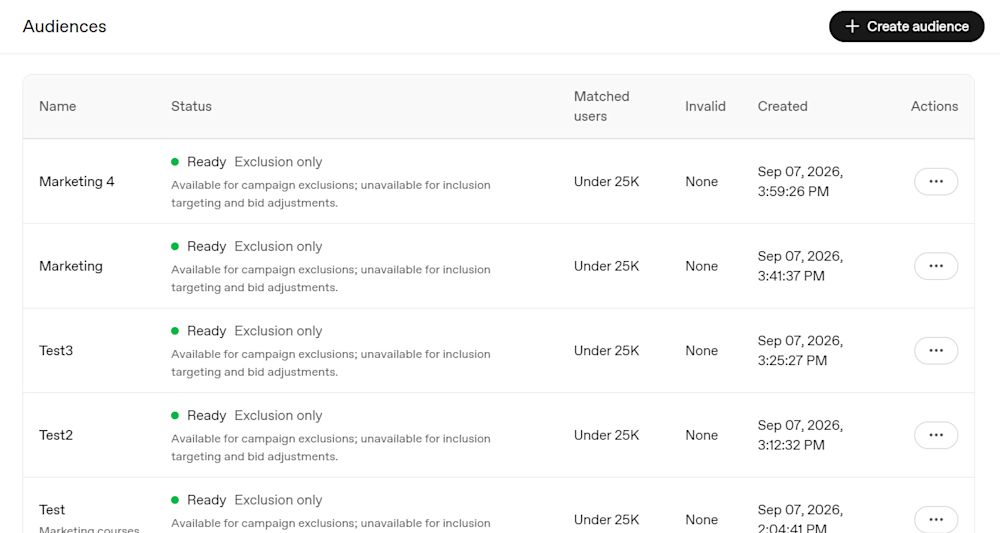
When an audience shows as “exclusion only” instead of eligible for inclusion, teams often assume the drag-and-drop upload failed.
Audiences with fewer than 25,000 matched users can be used for exclusions but not for inclusion or bid adjustments. Failed processing can come from invalid CSV or TXT structure, unsupported identifiers or formatting problems.
In practice, one common cause is a CSV uploaded without a valid header row or a TXT file that is really a comma-separated file in disguise.
The clean diagnostic order is simple:
Confirm whether the source file is truly CSV or TXT
Confirm header-row presence for CSV
Check each identifier type
Remove blank rows and mixed delimiters
Verify normalization happened before hashing
Then re-upload a smaller clean test file
Once the platform recognizes the audience correctly, you can use inclusion and exclusion on the same campaign as long as the final eligible audience after exclusions still clears the size threshold.
Case study: Creating audience segments for a working professionals course
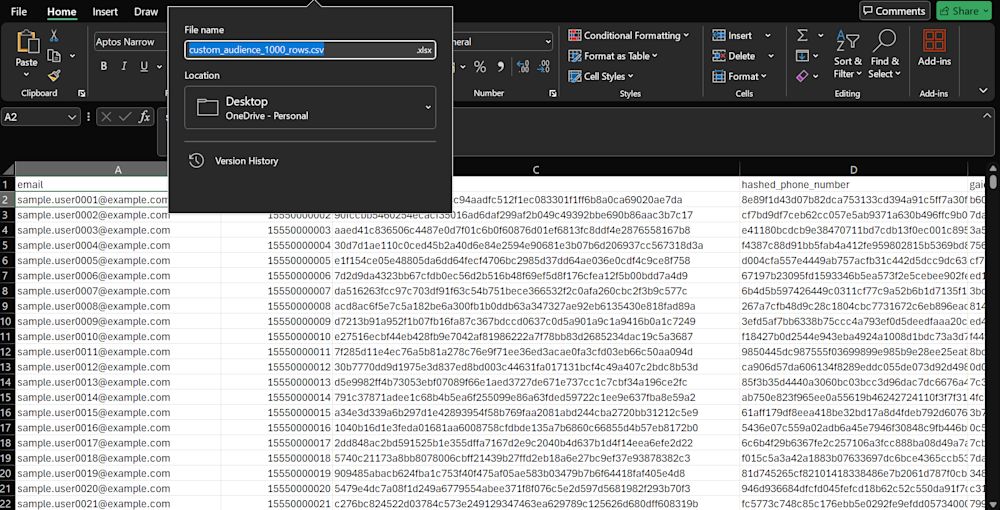
For course marketing, lifecycle stage matters more than almost any creative trick. Start with separate audiences for inquiry leads, brochure downloaders, webinar attendees, abandoned-application users, enrolled students, alumni, corporate L&D contacts and agency-side marketers. Create an excel file with all the data and save it in CSV or TXT structure.
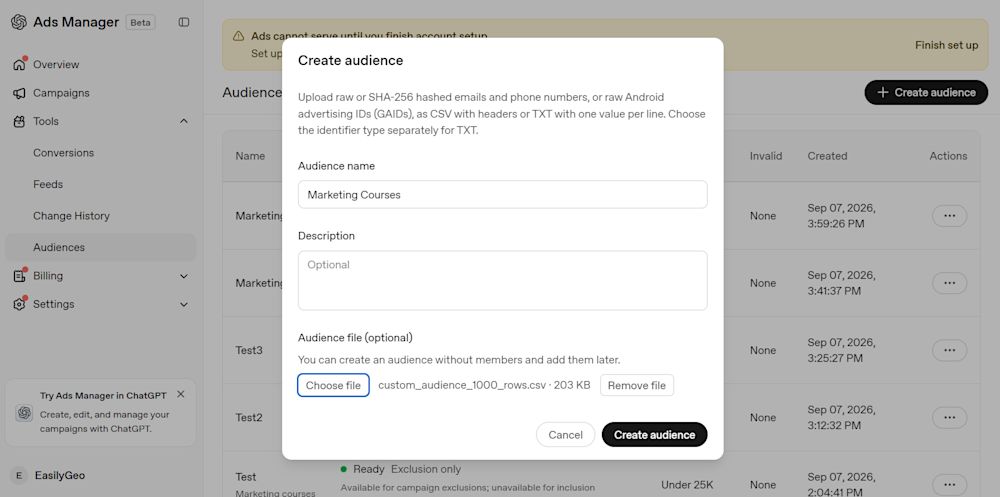
Enter a clear audience name and an optional description. Next, upload the prepared CSV file containing your customer identifiers, such as email addresses, phone numbers, hashed emails, hashed phone numbers, or GAIDs. Make sure the CSV includes a supported header for each identifier type.
Once the file is attached, review the details and click Create audience. Ads Manager will process the uploaded records and prepare the audience for use.
The guardrail is obvious: list use has to fit the consent language, your privacy policy and the platform’s first-party data rules. OpenAI’s terms say audience data must be first-party and not sourced from data brokers or marketplaces.
Merge audiences when one list is too small or too narrow
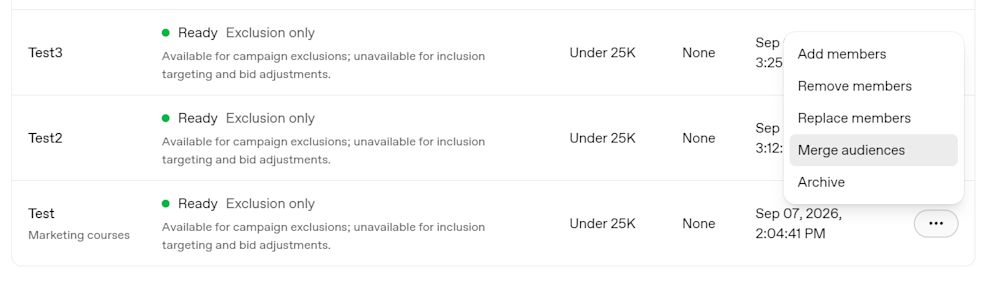
A simple example is merging Test 1 and Test 2 into a single pool. In real course marketing, that usually means combining webinar leads with brochure downloaders, or merging agency-marketer leads gathered from events, lead forms and newsletter signups so the audience can clear eligibility thresholds.
The trade-off is intent quality. Merging improves scale but can blur signal if the lists come from very different funnel stages. Someone who attended a pricing webinar is not the same as someone who downloaded a broad career guide six months ago. Keep merged-audience names explicit so reporting still tells the truth about what went in. We like names that preserve source logic, time period and geography instead of generic labels like “combined master list.”
The smartest setup pairs audience targeting with AI visibility data
Custom audiences help you decide who you can reach. AI visibility analytics help you understand how your brand is actually surfacing once people start exploring, comparing and asking follow-up questions. That is the part we focus on every day at EasilyGeo. We show how brands are cited across engines and geographies, which sources keep appearing, how competitors are surfacing and where your visibility is strong or thin. If you want a quick benchmark for source trust inside ChatGPT, our AI Trust Score is a useful place to start. If you want the broader strategic context, our piece on the rise of GEO maps out why AI discovery now needs its own measurement layer.
Custom Audiences are only one part of a successful ChatGPT Ads strategy. The real impact comes from identifying the right audience, structuring campaigns effectively, and using first-party data to reach people who are most likely to engage with your brand. We help brands plan, launch, and optimize ChatGPT Ads campaigns that drive qualified traffic and better marketing outcomes.
See how your brand shows up across AI platforms before you scale your audience targeting
Book a demo with us at EasilyGeo to see how your brand can run a ChatGPT ad and show up across AI search engines, which sources get cited and where custom-audience campaigns can support stronger AI visibility and smarter media decisions.