Content Cannibalization: What It Is and How to Fix It
On this page
- What content cannibalisation actually is and when two pages are not a problem
- Why cannibalisation hurts rankings, clicks and conversions even when both pages get impressions
- How to check for keyword cannibalization in Google Search Console without getting fooled by noise
- Use an intent-first matrix to decide whether to keep both pages, separate them, or consolidate
- The right fix depends on the page pair: merge, redirect, canonicalize, noindex, or rewrite
- What a real cleanup looks like when one query cluster stops bouncing between URLs
- A simple prevention system that keeps new pages from competing with old ones
- See whether AI search is citing the right page before cannibalisation turns into lost visibility
Content cannibalisation can affect organic search performance, even when a website has strong content and rankings. When multiple URLs target the same query and search intent, they may compete instead of supporting one authoritative page.
This doesn't mean Google penalises websites for overlapping content. The real problems are ranking dilution, search intent confusion, and inconsistent URL selection. Google may rank a less relevant page instead of the one you want users to find.
With the rise of AI-powered search, the challenge goes beyond Google rankings. AI platforms like ChatGPT also select and cite sources when generating answers, making clear content structure and page relevance increasingly important.
For example, even after fixing keyword cannibalisation in Google Search, an AI platform might still reference an outdated guide instead of the updated page.
That's why businesses need to monitor which pages appear in AI-generated answers and how often they're cited. Our guide on AI Trust Score and ChatGPT citations explains how to evaluate visibility across AI search platforms.
The goal isn't to eliminate every overlapping page. It's to ensure each search intent has one clear, relevant, and authoritative page that both search engines and AI platforms can identify.
What content cannibalisation actually is and when two pages are not a problem
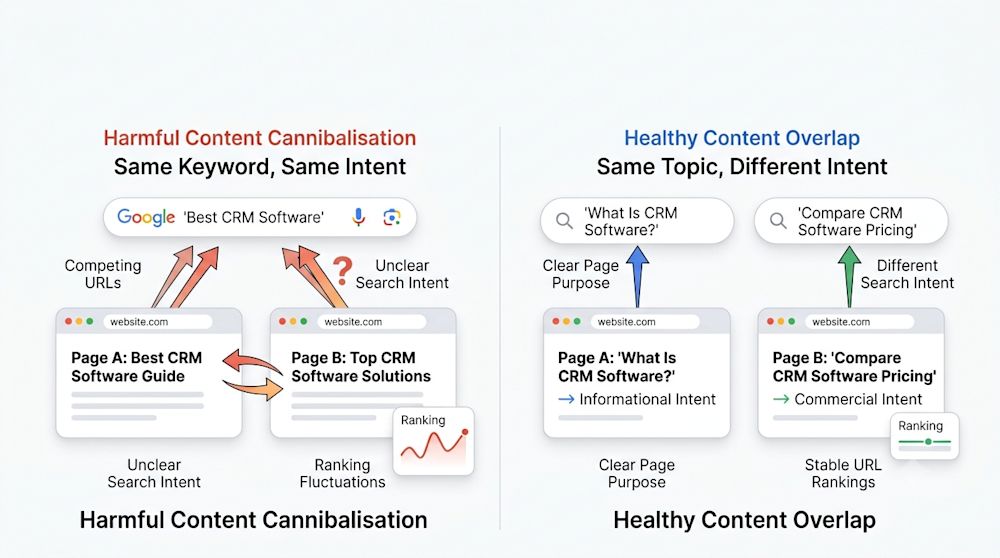
If you came here asking what is keyword cannibalization in seo, here is the plain-English answer: content cannibalisation happens when multiple pages on the same site compete for the same query or the same search intent, so Google has to guess which URL is the best fit. That guess can shift over time, especially when the pages are near-duplicates or do the same job. (developers.google.com)
That is different from broader topic overlap. Two pages can mention the same phrase without cannibalizing each other if the intent, page type and conversion role are clearly different. A blog post can answer “how does it work,” while a category page serves “I’m ready to compare and buy.” A service page can explain the offer nationally while a city page targets local proof, pricing and contact details. A product page can sell the item while a buying guide helps people compare options before they commit.
Harmless multi-URL visibility usually looks stable. One page owns informational variants, the other owns commercial or local variants and they do not keep swapping places on the same cluster. Harmful overlap looks different: both pages rank in the top 20 for the same family of searches, neither clearly owns the intent and Google keeps rotating them. That is one reason we have been writing so much about the shift from Google to AI search. Clean page roles are easier for search engines and answer engines to understand. (blog.google)
Why cannibalisation hurts rankings, clicks and conversions even when both pages get impressions
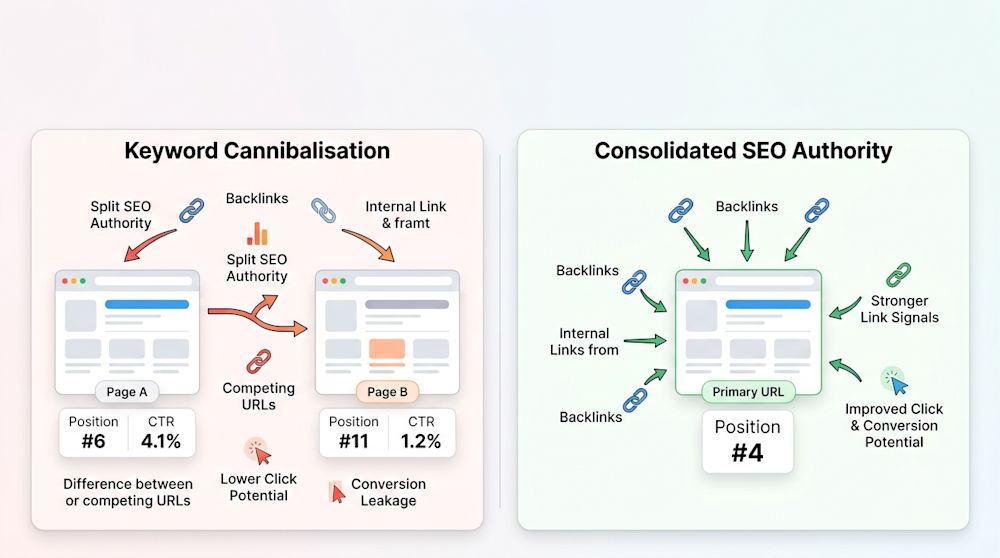
The damage usually starts with dilution. Backlinks point to different URLs. Internal links and anchor text point to different URLs. Freshness signals, engagement signals and on-page relevance get split across pages that should have been one strong asset. Google’s canonicalization systems are built to choose a representative URL from similar pages, but when your site sends mixed signals, the weaker page can win at the wrong moment. (developers.google.com)
Picture a simple example. Page A sits at position 6 with a 4.1% CTR. Page B sits at position 11 with a 1.2% CTR for the same query family. Both get impressions, so nothing looks broken at first glance. After consolidation, the surviving page moves to position 4 and the combined CTR jumps because one stronger URL now holds the links, the title and the internal anchor support. That is the kind of lift teams miss when they only track “total impressions.”
Clicks are only part of the loss. If an educational article outranks the page that actually sells the service, conversions leak too. We see this a lot when rankings look fine in a dashboard but the wrong URL is doing the winning. That is one reason our piece on why rankings alone miss AI visibility resonates with so many teams. Not every overlap causes a dramatic drop, but a lot of them create month-to-month URL switching that quietly drags performance down. (blog.google)
How to check for keyword cannibalization in Google Search Console without getting fooled by noise
If your real question is how to check for keyword cannibalization or how to check keyword cannibalization, start in Search Console and stay there longer than most people do. One-day snapshots lie. Cannibalisation is usually a trend problem.
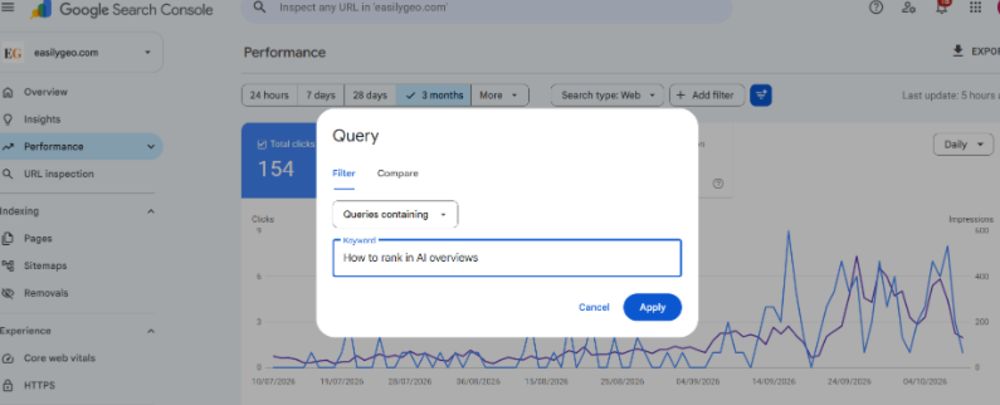
Open the Performance report and start with a 3 to 6 month date range. If you sell mainly in the United States, check the U.S. filter separately before you generalize from global data.
Filter by one core query or by a tight query cluster, then switch to the Pages tab to see which URLs earned clicks and impressions for that demand.
Compare clicks, impressions, CTR and average position for each URL. Export the data if the cluster is large.
Segment by device and country when behavior differs. Mobile often surfaces a different winner than desktop.
Check the same pair month by month. What matters is not just that two URLs appear, but whether the lead URL keeps switching.
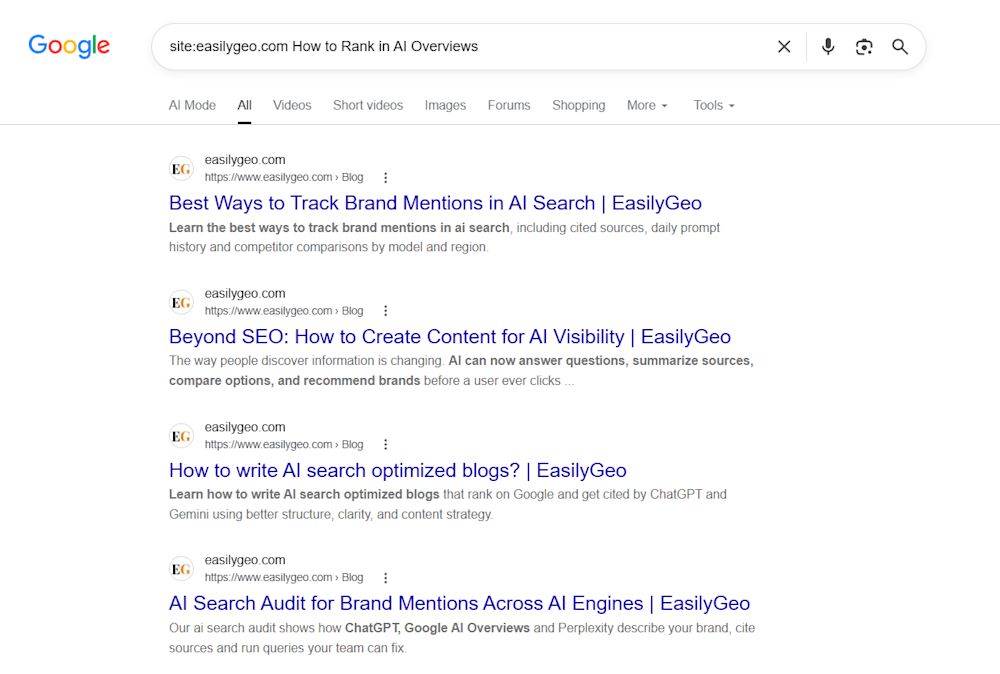
Manual searches help you find suspects fast. Use site:yourdomain.com "query" to see which pages Google associates with the term and use intitle: searches to spot titles that are stepping on each other. Just do not treat site searches as proof. Google has said site: queries are low reliability and recommends Search Console for this kind of work. (developers.google.com)
Our rule of thumb is to call it likely true cannibalisation when two URLs each hold at least 20% of impressions for the same query cluster over eight or more weeks, their average positions sit within a five-position band, CTR differs by at least 30% and the lead URL switches three or more times month to month. Those are thresholds, not laws. They work because they separate harmless coexistence from unstable competition you can actually measure.
Then add a conversion check. If the lower-clicked page converts materially better in GA4 or your CRM, do not rush to merge it. You may have a messaging problem, not a page-count problem. In that case, the better move is often to keep the stronger converting offer alive and re-optimize the weaker page toward a cleaner informational role.
Use an intent-first matrix to decide whether to keep both pages, separate them, or consolidate
The fastest way to stop guessing is to judge page pairs by intent first and URL format second. Start with what the searcher wants done, then decide whether you need one page or two.
Page pair | Primary intent | Can coexist when | Cannibalizing when | Best fix |
Blog post vs category page | Learn vs shop | The post answers broad questions and the category targets modifiers like price, buy, or compare | Both pages target the same head term and keep swapping for commercial queries | Narrow the post to education or consolidate into the category hub |
Location page vs service page | Local service vs general service | The location page has city-specific proof, reviews, map context and local CTA | City pages are near-clones and outrank the main service page for generic service searches | Rewrite for local proof or merge thin locations into stronger regional pages |
Product page vs buying guide | Purchase vs evaluation | The guide compares options and the product page handles specs, price and purchase actions | The guide starts ranking for exact product-buying terms or the product page targets comparison queries | Keep both, but separate titles, H1s, internal links and CTA language |
FAQ vs landing page | Quick answers vs conversion | The FAQ supports objections and links clearly into the landing page | The FAQ duplicates the offer page and captures the same demand with weaker conversion paths | Fold useful answers into the landing page or noindex the thin FAQ |
Once you make that call, your site architecture has to reinforce it. Titles, H1s, internal links, breadcrumbs and CTAs all need to point at the same winner. When we help teams plan new content, we use the same logic in our guide to writing AI-search-friendly blog posts because intent separation is easier to build early than to fix later.
The right fix depends on the page pair: merge, redirect, canonicalize, noindex, or rewrite
Merge pages when both target the same intent and one is clearly stronger. Pull over any unique sections, FAQs, examples, screenshots and backlinks worth preserving, then use a permanent redirect from the retired URL. Google treats permanent redirects as a canonical signal and Google has also said 301s do not cause a loss in PageRank during a move. (developers.google.com)
Use a canonical only when near-duplicates genuinely need to remain live, such as filtered product variants, printer-friendly pages, or syndicated copies you still want accessible. Canonical is a strong signal, but it is still a hint rather than a command, which means Google can pick a different representative URL if the content and technical signals disagree. (developers.google.com)
Use noindex sparingly for low-value support pages that should not compete in search at all. Google’s guidance is clear that noindex removes the page from Google Search once crawled, but it is not the preferred way to settle canonical selection inside one site if the page should still compete. That makes it a cleanup tool, not a default fix. (developers.google.com)
Rewrite or narrow one page when both deserve to exist but are aiming too broadly. Change the title, H1, internal anchors, examples and CTA so each page owns a distinct job. We use the same principle in our roundup of practical GEO tactics that improve citations: clear intent boundaries make it easier for machines to pick the right page.
After any fix, clean up the internal links, update the sitemap, request indexing on the surviving URL and watch the query-to-page map for six to eight weeks. Google’s canonicalization docs note that re-evaluation can take time, so do not declare victory after three days. (developers.google.com)
What a real cleanup looks like when one query cluster stops bouncing between URLs
Here is a modeled example based on the SaaS and service-site patterns we see most often. Two guides were targeting the same query cluster and generated 18,400 combined impressions over 90 days. One held 62% of impressions and averaged position 7.8 with a 2.9% CTR. The other held 38% and averaged position 9.4 with a 1.7% CTR. Together they produced 14 lead conversions, but most of those leads came from the weaker page because its CTA was better.
The cleanup was simple on paper and fussy in practice. We merged the unique sections into one stronger guide, tightened the title and H1 around a single intent, kept one distinct landing page for the transactional angle, redirected the retired guide and rebuilt internal links from related posts. Over the next 90 days, the consolidated guide reached 24,900 impressions, 1,040 clicks, an average position of 4.9 and 31 leads. That is the pattern we are after: less URL switching, stronger CTR and a cleaner handoff from education to conversion. If you want more examples of how this kind of clarity plays out in generative discovery, our post on how businesses are winning with GEO is a useful companion.
A simple prevention system that keeps new pages from competing with old ones
The question our customers ask most is not which fix to use. It is whether they needed a new page in the first place. The best prevention system starts with a query map that assigns one primary cluster, one primary intent and one canonical page type to every new URL before anyone writes a draft.
Our lightweight content brief has five fields: target query cluster, primary intent, secondary intents to avoid, canonical page type and neighboring pages that must be linked or clearly differentiated. Before publishing, we run a quick overlap check in Search Console, a manual site: search and an internal-link review. We keep the operating system simple because teams actually use simple systems. You can see that same bias toward practical workflows across the EasilyGeo blog on AI visibility and GEO.
This also helps beyond Google. Clean query-to-page mapping gives answer engines a clearer source to summarize and cite, while muddled overlap invites the wrong URL into AI answers. Google’s search documentation now distinguishes between indexing controls and whether content can be used in AI Overviews and AI Mode, which is another reminder that page clarity now affects more than one discovery surface. (developers.google.com)
See whether AI search is citing the right page before cannibalisation turns into lost visibility
Once you clean up overlap in Google, the next step is making sure AI systems recognize the same winner. With our platform for tracking AI search visibility, you can see which of your pages ChatGPT, Perplexity, Gemini, Claude and other AI search tools actually surface and cite, which queries they run, whether the wrong URL is surfacing because of content cannibalisation and how your visibility compares with competitors.
Frequently Asked Questions
How do I check for keyword cannibalization in Google Search Console?
Open Google Search Console, go to Performance, and filter by a specific search query. Check the Pages tab to identify URLs ranking for that keyword. Compare clicks, impressions, CTR, and average positions over three to six months to identify potential cannibalization.
How do I fix keyword cannibalization without losing rankings?
Start by identifying overlapping pages and evaluating their search intent. Merge similar content into the strongest page and use 301 redirects where appropriate. If pages serve different purposes, optimize their titles, headings, and internal links to differentiate them.
Does keyword cannibalization negatively affect SEO rankings?
Keyword cannibalization can affect SEO rankings when multiple pages compete for the same search intent. It may split internal linking signals, cause ranking fluctuations, and result in Google displaying a less relevant page. However, multiple pages ranking for the same keyword is not always a problem.
Can keyword cannibalization affect AI search visibility?
Yes, overlapping content can make it harder for AI search platforms like ChatGPT, Gemini, and Perplexity to identify the most relevant page to cite. Clear search intent, well-structured content, and consistent internal linking can help AI systems identify the appropriate source.